Documents
Connect Gmail and Outlook
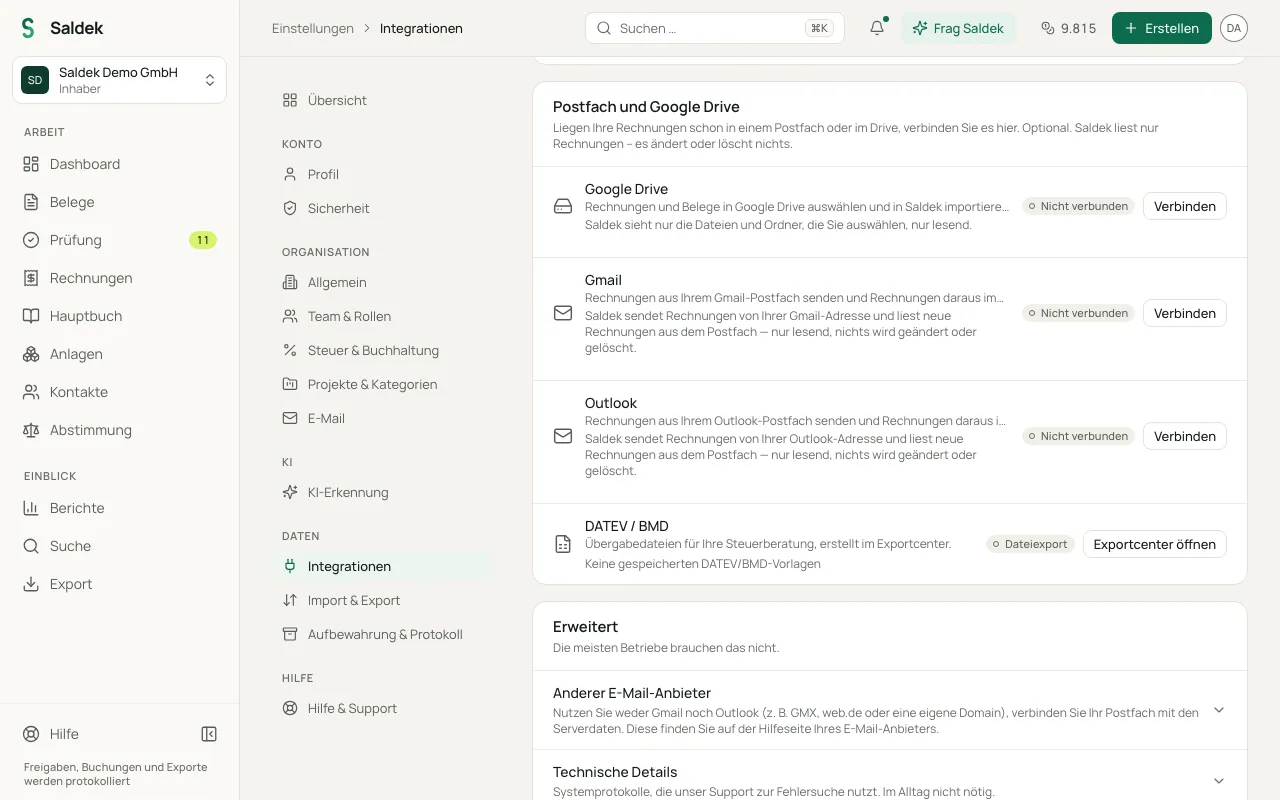
Connect a Google Mail or Microsoft Outlook account to use it for documents and invoices. After you grant access, choose separately whether Saldek searches your mailbox for invoices and whether it sends invoices from your e-mail address.
Connect an account and start the search
- Open integrations: In Saldek, go to “Settings” → “Integrations”.
- Connect your account: Select “Connect” for Google or Microsoft, then grant read and send permissions in one step.
- Choose the start date: Turn on “Import invoices”. Saldek asks from when it should search. Choose “Last 3 months”, “Since the start of this year”, “Since the start of last year” or a date of your own; nothing is preselected.
- Wait for the search: Saldek checks your mailbox from that day until today and shows its progress. The search is free.
- Choose what to import: Open the results. Certain invoices are preselected; tick the ones you want and select “Import selected”. Credits are used only for the documents you import.
- Add missing permissions: If you leave a permission unchecked in the consent dialog, Saldek displays “Add permission”.
Which e-mails count as invoices
Saldek applies fixed rules and uses no AI for the search. Structured e-invoices (XRechnung, ZUGFeRD, ebInterface) always count. PDFs and photos count when the subject, the file name or the text carries an invoice word such as Rechnung, Invoice, Fatura, Facture, Fattura, Factura or Račun, or when the sender is a supplier Saldek already knows. Newsletters, promotions, your own sent mail and calendar invitations are left out.
- Certain: Saldek preselects these in the results and imports them automatically from new e-mails.
- Possible: These wait under “Suggestions” and need one click from you to be imported or dismissed.
- E-mails without an attachment: Receipts that only exist in the e-mail text, such as those from Uber, Apple or Amazon, can be candidates too. Saldek turns the text into a readable PDF and keeps the original e-mail as the archived original. They are never imported automatically; they always wait for your decision.
After the first search
Saldek then checks new e-mails with the same rules. Certain invoices are imported automatically, and possible ones wait under “Suggestions” in “Review” and under “Documents” › “Mailbox suggestions”, where you accept or dismiss each with one click. Under “Imported automatically” you can see for 30 days what came in by itself.
To look further back, select “Search older e-mails” on the mailbox card and pick an earlier day, for example with the quick choices “1 year ago”, “2 years ago”, or “Earliest”. The card then shows how many possible invoices were found in older e-mails; with “Review and import” you choose what to take over. None of it is imported automatically, not even with “Check new mail now”, which only reads e-mails that arrived since the last check. If a search reaches 20,000 e-mails, it stops with the newest ones and tells you how far back it got.
If you prefer full control, turn on “Only e-mails with the label ‘Saldek’”. Saldek then reads only messages that carry the Gmail label “Saldek” or sit in the Outlook folder “Saldek”. Create the label or folder first.
How the integration works and how to disconnect
Saldek reads your mailbox without changing or deleting any messages. For candidates it keeps the sender’s name and domain, the subject and the attachment names for at most 30 days; the e-mail text is read only to assess it and is not stored unless you import the e-mail. Switching off the import stops everything. Disconnecting also deletes the candidates.
Other ways to send documents
- E-mail forwarding: Forward invoices to your personal Saldek inbound address.
- Your own IMAP server: Connect your mail server using TLS encryption.
- Manual upload: Drag and drop documents into Saldek in your browser.
Frequently asked questions
Why does Google show a warning?
Until Google completes its formal verification process, it classifies new integrations as unverified apps and limits access to 100 users.
Does Saldek read all my e-mails?
Saldek searches only the period you choose, by fixed rules and without AI, to find invoices and receipts. It does not change or delete e-mails. Only what you import, and certain invoices from new e-mails, becomes a document.
Does the search cost credits?
No. Credits are used only for documents that are imported, and the amount depends on the document type and the number of pages.
Can I choose a different start date later?
Yes. Select “Search older e-mails” to go further back, or switch the import off and on again to choose a new start date.
Can I send invoices from my own mailbox?
Yes. After connecting Gmail or Outlook, turn on “Send invoices”. Saldek will send invoices through that account.
Last updated: