AI and review
How the AI reads documents
Saldek automates preliminary bookkeeping by extracting the supplier, date, net and gross amounts, VAT, tax rates, and individual invoice line items. The AI can read invoices with multiple items and tax rates, cash receipts, and structured e-invoices in ZUGFeRD, Factur-X, XRechnung, and ebInterface formats.
The four steps in document processing
After upload, each file passes through four steps in the processing queue:
- Upload: Saldek receives JPG, PNG, HEIC, PDF, CSV, or XML files up to 25 MB through your browser or an integration.
- OCR: Saldek recognizes text and converts the document into structured data.
- AI extraction: The AI identifies fields such as supplier, invoice date, amounts, tax rates, and line items.
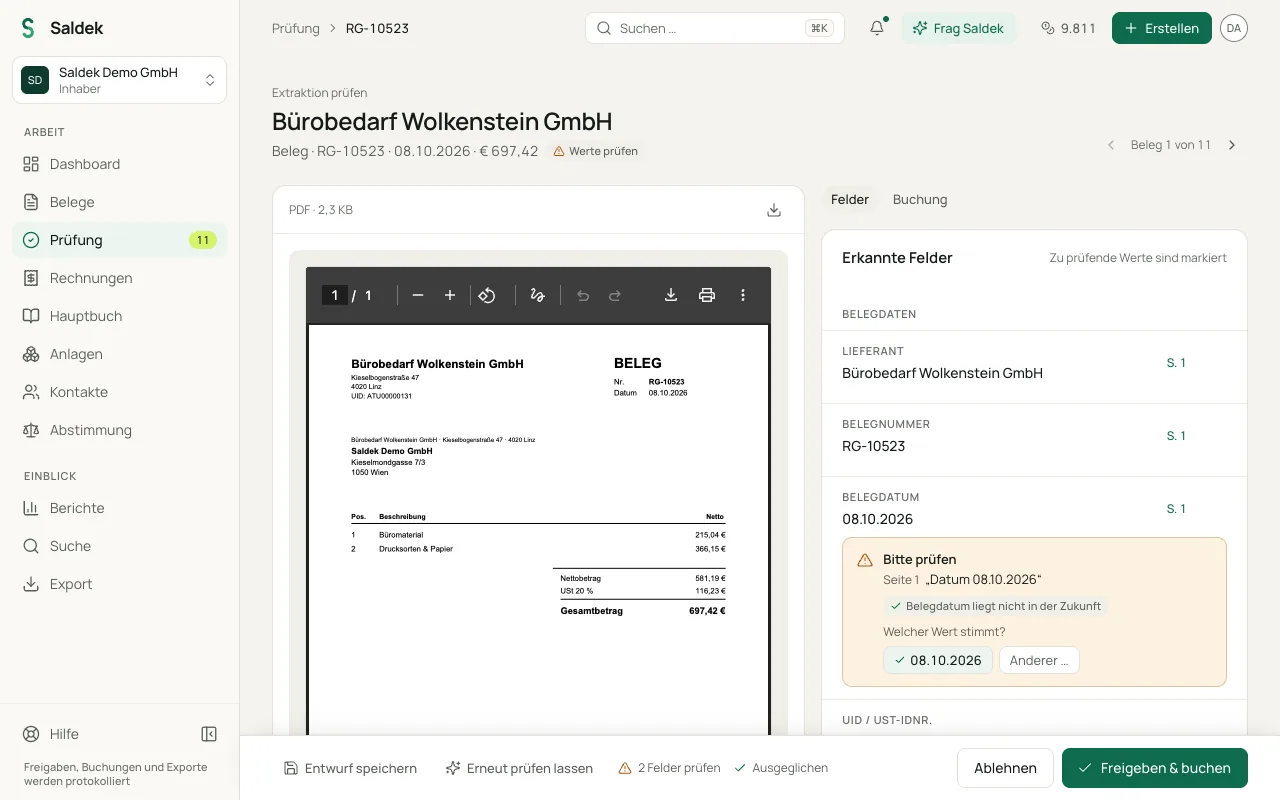
- Validation: Saldek checks mathematical and logical rules, such as whether net plus VAT equals gross and whether the document date is not in the future. If the document omits a value, Saldek calculates it and notes that it did so.
Checks against the document
Saldek checks each extracted value against the document itself, for example whether a value is printed on it and whether the amounts add up. If Saldek cannot confirm a value, it sends the document to the review queue and marks the value with “Please check”. Values it confirmed need no check from you. Saldek shows you a supplier’s first reverse-charge invoice to check; later invoices with the same supplier, VAT ID, country, currency, and tax treatment follow that check (“Reverse charge: follows an earlier check”). You check each partial refund once yourself.
When Saldek asks and what it only files
Besides the text, Saldek also reads the image of the first page, for example to recognize a “paid” stamp. Whatever the document alone does not settle, Saldek asks about in review and names the reason there; “Ask Saldek” explains it in more detail on request. Typical cases:
- No booking needed: Saldek files quotes, pro-forma invoices, delivery notes, order confirmations, bank statements, and notices with no amount due as “Not bookable”, without a draft entry.
- Related documents: A payment confirmation or reminder that arrives before its invoice is linked to the invoice as soon as it arrives. A payment confirmation on its own books nothing extra.
- Foreign currency: Saldek converts to euros at the official rate of the document date and notes the rate. It asks only when the document itself shows a euro amount charged that differs by more than 2%.
- Unclear account: If nothing settles the expense account, the draft books to the account for other operating expenses, and you choose the right account before approval.
- Other reasons: for example a possible double purchase, foreign VAT, an unclear business purpose, missing invoice details, or a fiscal year that is not open.
AI providers, data privacy, and storage
Saldek uses Jev by TypeSafe and OpenAI for AI processing; both process data in the USA. For TypeSafe, the EU standard contractual clauses (SCC) in its data processing agreement apply. OpenAI processes the data through OpenAI Ireland Ltd, safeguarded by the EU standard contractual clauses between OpenAI Ireland Ltd and its affiliates in the USA. Saldek uses Google Gemini only as a fallback when the primary processing does not produce a usable result; the Data Privacy Framework (DPF) applies, otherwise SCCs. Anthropic does not provide AI services to Saldek.
Saldek does not use your documents to train AI models. Hetzner hosts Saldek’s application servers and databases in Germany. Amazon S3 stores document files in Frankfurt (region eu-central-1).
Limits of document recognition
Poor scans, blurry photos, crumpled thermal paper, and handwritten notes can make automatic recognition less reliable. Saldek creates a draft booking for every extraction. A person with the appropriate role must review and approve it before Saldek posts the booking.
Frequently asked questions
Does Saldek use my documents to train AI models?
No. Saldek does not use documents or receipt data to train AI models.
What does “Without AI” mode do?
In “Without AI” mode (local_only), Saldek sends no data to AI providers and does not extract documents automatically. You must enter the information manually.
How many credits does document extraction use?
Extraction uses credits from your plan’s credit balance. The cost varies by document type and page count. Saldek reserves the estimated number of credits before processing and refunds them if extraction fails.
Last updated: