Getting started
Countries and packages
When you register an organization, select the country where your business is based. That choice determines the chart of accounts, available tax keys, report formats, and country-specific e-invoicing formats. Each organization supports one country. For another company, create a separate organization with “Switch organisation” › “Create organisation”. Only your first organization gets the trial; every further one needs its own plan.
What each country package includes
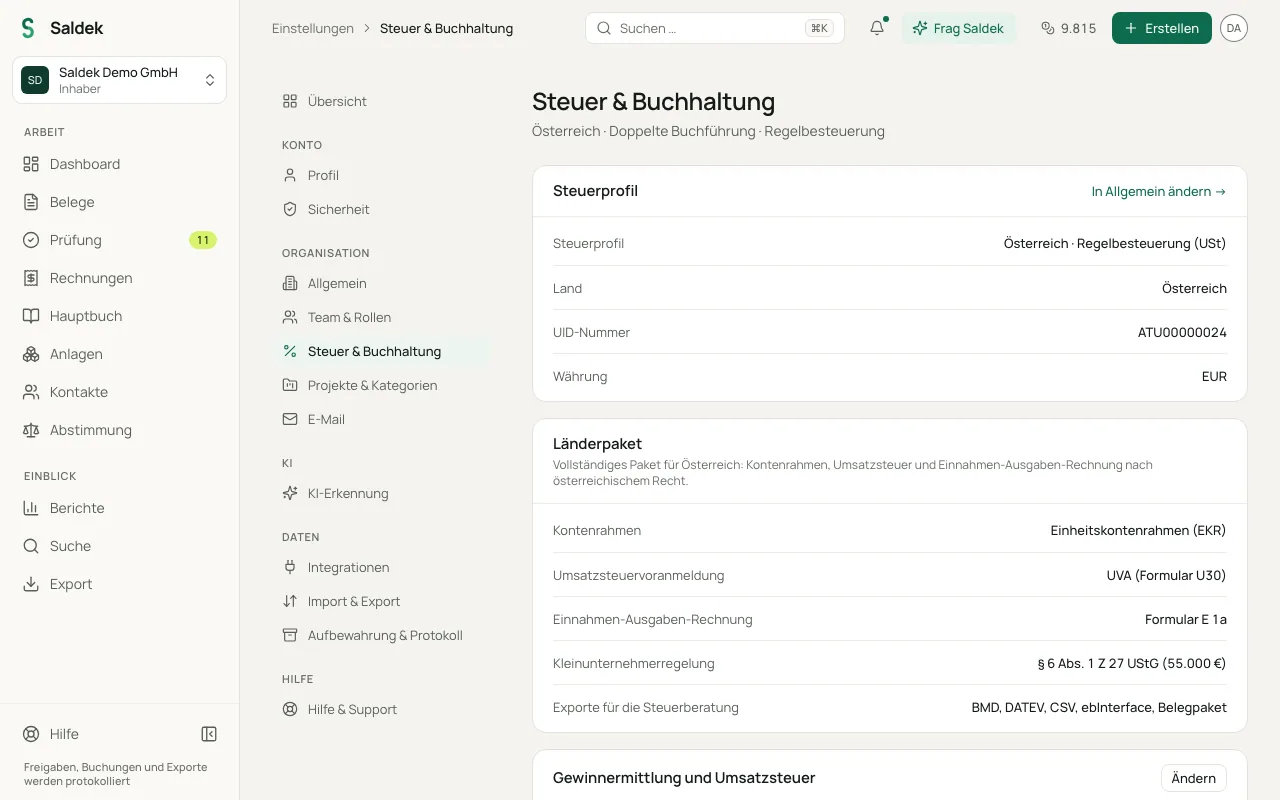
- Austria (complete package): Standard Chart of Accounts (EKR), Austrian tax keys, advance VAT return (UVA with Form U30 and codes such as KZ 095), cash-basis accounting with pre-filled Form E 1a, the small-business regulation under § 6 Abs. 1 Z 27 UStG, BMD and DATEV exports, and ebInterface.
- Germany (complete package): SKR03 chart of accounts, German tax keys, advance VAT return (UStVA with codes), cash-basis accounting (EÜR pre-filled for Anlage EÜR through line 75), the small-business regulation under § 19 UStG, DATEV export, and XRechnung.
- Other EU countries, Switzerland, and Liechtenstein (basic package): A neutral basic chart of accounts with the applicable national VAT rates, document capture, AI extraction, review queue, invoicing, e-invoicing formats, and tax-advisor exports. Country-specific tax returns are not included.
What the basic package includes
Organizations in other EU member states, Switzerland, and Liechtenstein receive the basic package. You can capture documents, use AI extraction, and create invoices with your country’s tax rates. The VAT report lists tax bases by tax key so you can prepare your filings. The package does not include country-specific forms such as UVA, UStVA, E 1a, or Anlage EÜR.
View your country package in Settings
- Open Settings: Select “Settings” in the navigation.
- Open tax settings: Select “Tax & accounting”.
- Check your package: The overview shows your active country package, selected profit-determination method, and configured chart of accounts.
Other basic settings
- “Fiscal years”: Under “Settings” › “General”, see your fiscal years and add a new one. A closed year is locked for postings.
- “Vehicle costs”: Under “Settings” › “Tax & accounting”, choose how Saldek books fuel, charging, repairs, parking, and tolls, and whether it asks about every vehicle expense. Austria has three options, other countries two. Owners and admins can change this setting.
Frequently asked questions
Which countries does Saldek support?
Austria and Germany have complete country packages with country-specific tax forms and reports. Other EU countries, Switzerland, and Liechtenstein have the basic package, with a neutral chart of accounts and national tax rates.
Can I use the UVA in another country?
No. The form-specific UVA (Form U30) is available only to organizations registered in Austria. German organizations can use the UStVA. In the basic package, Saldek shows tax bases by tax key in a general VAT report.
Last updated: