Invoices
Send invoices
Use “Send invoice” to email a completed invoice as a PDF attachment. Saldek uses its own sending service by default. Set the default method in settings and change it before sending an individual invoice.
Set up an email delivery method
- Check your contact email: Add your company’s contact email address under “Settings” > “General”. Saldek requires it as the reply-to address (Reply-To).
- Choose a delivery method: Under “Settings” > “Email”, choose Saldek or your own mailbox.
- Set up your SMTP server: To use your own server, enter its host, port, username, and password. Saldek encrypts your credentials.
- Send a test email: Check the SMTP connection with the test-send button.
- Send the invoice: Open the invoice under “Invoices” and select “Send invoice”.
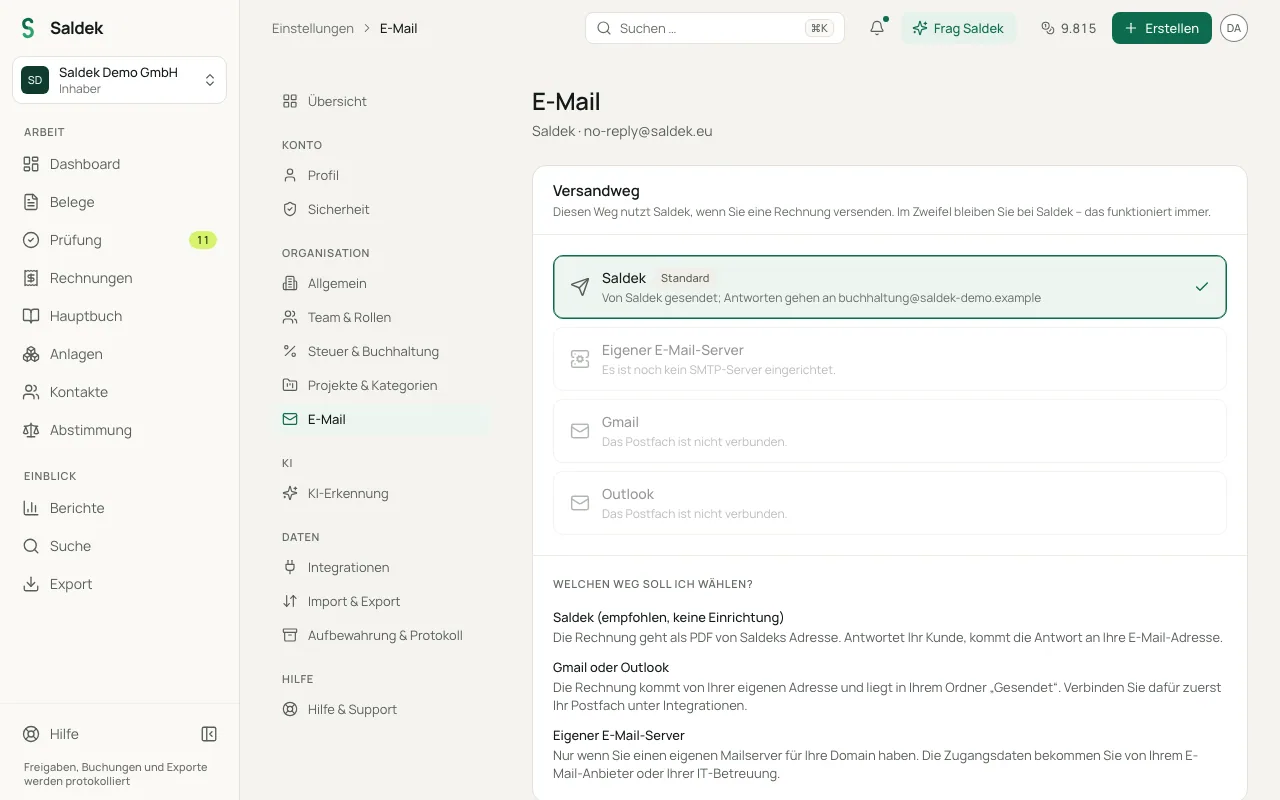
Delivery options
- Send through Saldek: Saldek sends the email from “no-reply@saldek.eu” through Resend. Your organization’s contact email is set as the reply-to address (Reply-To). This option is available on all plans.
- Use your own mailbox (SMTP): Connect your SMTP server with its host, port, username, and password. This option is also available on all plans.
- Use a connected mailbox (Gmail / Outlook): Connect your Google or Microsoft mailbox under “Settings” > “Integrations” to send invoices from that account. This option is available on the Starter plan and above.
Frequently asked questions
Which address sends the invoice?
With standard delivery through Saldek, the sender address is “no-reply@saldek.eu”, and customer replies go to your organization’s contact email address. When you use your own mailbox through SMTP or Gmail/Outlook, the invoice comes directly from your address.
Can I use my own mailbox?
Yes. Add your own SMTP server details in settings, on any plan, or connect a Gmail or Outlook account, starting with the Starter plan.
Which plans let me send invoices?
You can send through Saldek or your own SMTP server on any plan. Sending through a connected Gmail or Outlook mailbox is available on the Starter plan and above.
Last updated: