Account and security
Team & roles
Work with your team or external tax advisor in the same Saldek organization. Each person’s role sets the actions they can perform.
Roles in Saldek
Saldek has six roles, from highest to lowest permissions: “Owner”, “Admin”, “Accountant”, “Reviewer”, “Member”, and “Viewer”. When assigning roles, you can assign a role only up to your own level.
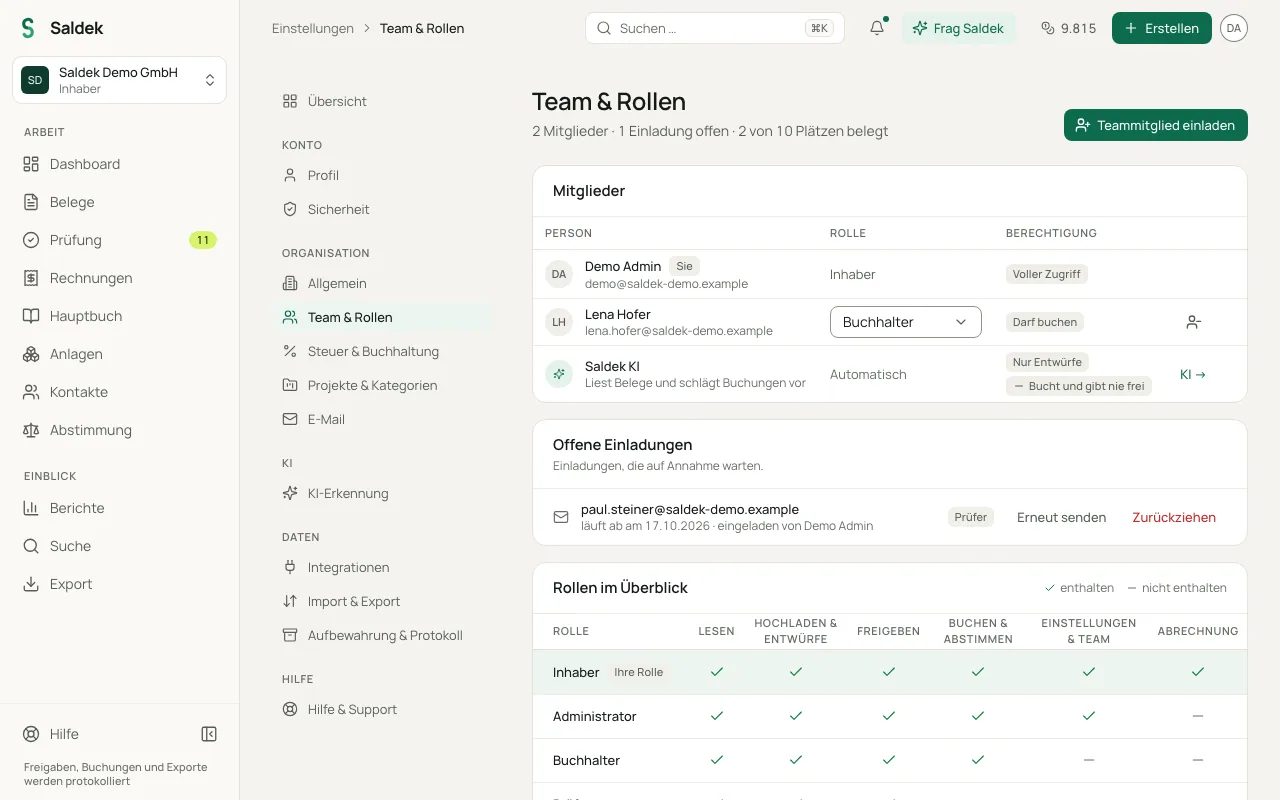
- “Owner”: Has the highest permission level. Only the “Owner” can invite members and manage billing.
- “Admin”: Can change organization settings and manage members.
- “Accountant”: Can post entries to the ledger using “Approve & post”, reconcile bank transactions, manage fixed assets, start depreciation runs, and manage projects and categories. This is the recommended role for an external tax advisor.
- “Reviewer”: Can check and approve documents but cannot post. A person who may post then posts the approved drafts.
- “Member”: Can upload documents and prepare drafts, but cannot approve or post.
- “Viewer”: Can read documents, bookings, and reports but cannot change anything.
- “Saldek AI”: Appears as its own row in the member list, with the role “Automatic”. It reads documents and suggests bookings, but only creates drafts and never posts or approves.
Permissions at a glance
- Posting: Requires the “Accountant”, “Admin”, or “Owner” role. “Reviewer”, “Member”, and “Viewer” roles cannot post documents.
- Organization settings and member management: Require the “Admin” role or higher.
- Inviting members and managing billing: Reserved for the “Owner”.
- Assigning roles: You can assign roles only up to your own permission level.
- Overview: Under “Team & roles”, “Roles at a glance” shows what each role may do: “Read”, “Upload & drafts”, “Approve”, “Post & reconcile”, “Settings & team”, and “Billing”.
User limits by plan
Your organization’s plan sets the number of users:
- “Starter”: up to 3 users. Invited people get the role “Accountant”. Roles can be changed to “Owner” or “Accountant”, and a member with another role from an earlier plan can be given a lower one.
- “Business”: up to 10 users.
- “Pro”: up to 25 users.
- “Enterprise”: unlimited users, with an individual agreement through “Contact us”.
- “Trial”: up to 3 users with all features for 30 days.
All six roles can be given and changed from the “Business” plan and during the trial; if your organization moves to a smaller plan, every member keeps their role. Admins and owners can see the audit log (“who changed what when”) under “Settings” › “Retention & log”. Viewing it is included from the “Business” plan and during the trial; changes are recorded on every plan.
Manage and invite members
- Open “Settings” and select “Team & roles”.
- As the “Owner”, enter the person’s e-mail address and assign a role no higher than your own.
- People with the “Admin” role can change roles or remove members from the member list.
Frequently asked questions
Who can post entries in Saldek?
You need at least the “Accountant” role to post entries using “Approve & post”. People with the “Reviewer”, “Member”, or “Viewer” role can review or view documents, but cannot post them.
How many people can I invite to my organization?
The limit depends on your plan: “Starter” allows up to 3 users, “Business” up to 10, “Pro” up to 25, and “Enterprise” has no user limit. You can add up to 3 users during the 30-day trial.
Who can invite members or change billing?
Only the organization’s “Owner” can invite members and manage billing. People with the “Admin” role can change organization settings and manage existing members.
Last updated: